Friday, May 9, 2014

Error "The type initializer for 'Microsoft.Exchange.Diagnostics.ExTraceConfiguration' threw an exception."

After installing KB2506143 "Windows Management Framework 3.0" having problems using Powershell scripts for Microsoft Exchange 2010 with the following error "The type initializer for 'Microsoft.Exchange.Diagnostics.ExTraceConfiguration' threw an exception.". Windows offers a search solution on the Internet, but found nothing. Therefore, we must do the following:
1. Reinstall Exchange Manage Tools
2. In batch scripts to add the parameter "%SystemRoot%\system32\WindowsPowerShell\v1.0\powershell.exe -version 2.0"
3. Rename or delete folders in profile "%userprofile%\AppData\Roaming\Microsoft\Exchange\RemotePowerShell"

Wednesday, April 9, 2014

Exchange 2003 Messages with unreachable destination, event id 4003, 984


Faced today with an unusual problem on the server Exchange 2003. Messages to one of the domains are stuck in the queue: "Messages with unreachable destination". Despite all attempts to restart the services and server messages do not go, but using telnet message domain go successfully. To understand the reason I enable the Diagnostic Logging in properties on Exchange server:


and found an interesting event id 4003 and 984 in the Application log: “The domain 'contoso.com' is currently unreachable.”, “NextHopType=CURRENTLY_UNREACHABLE” 


The decision was simple: I created a special connector for this domain and messages go.


Friday, February 21, 2014

iPhone redownload mail from Exchange

IPhone strange behavior found today. When you synchronize mail Exchange 2003 activesync iPhone at certain moments starts to download the mail again. Once out of ideas, I tried to capture traffic using Wireshark and found that iPhone redownload mail when it receives a proposal to change the password to the user. That is, users and iPhone Exchange 2003 should change the password for two weeks before password expiration to avoid constant rebooting mail.
The article http://support.microsoft.com/kb/292589 says that the proposal to cancel the password change notification can not be canceled.

iPhone sends a synchronization request mail
Exchange 2003 server offers change password
and further there is a full load mail.

Thursday, February 20, 2014

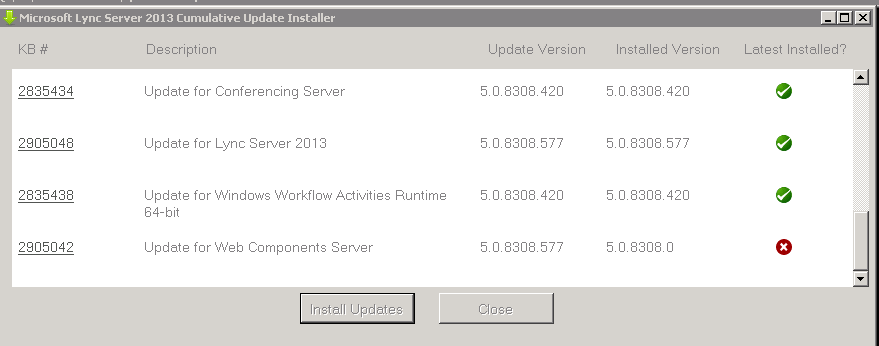
Reinstall Web Components on Lync 2013

Sometimes IIS server Lync behaves predictably (For example module OCSAuthModule error on login to the mobile client) :) and the question arises as to reinstall little effort. Below are the steps to reinstall:
1. Uninstall Web Components Server
2. Uninstall Web Conferencing Server, click Yes for deactivate
3. Reboot Server
4. Uninstall IIS URL Rewrite Module 2
5. Click Remove Server Roles, unmark Web Server (IIS) and next  - remove
6. Reboot Server
7. Check and remove .NET Framework 3.5.1 Features
8. Check and remove Windows process Activation Services. Reboot server.
9. Add  role Web Server (IIS)
10. Add Role Services, after install reboot
Static Content
Default Document
HTTP Errors
ASP.NET
.NET Extensibility
Internet Server API (ISAPI) Extensions
ISAPI Filters
HTTP Logging
Logging Tools
Tracing
Windows Authentication
Request Filtering
Static Content Compression
Dynamic Content Compression
IIS Management Console
IIS Management Scripts and Tools
Anonymous Authentication (installed by default when IIS is installed)
Client Certificate Mapping Authentication


11. Run Start - Lync Server Deployment Wizard
12. Install or Update Lync Server System - Setup or Remove Lync Server Components - Run
13. Install latest update for Lync Server. If Kerberos authenticate enable run command: Set-CsKerberosAccountPassword -UserAccount "contoso\KerbAuth"

Friday, January 10, 2014

Generate a certificate request for user authentication on the OWA, Activesync MS Exchange

1. First, open the Certificates snap-in “Start – Run – mmc – file – add snapin – certificates – my user” then open the window request generation look at the picture
 2. Click next
 3. Click next
 4. Choose “Legacy key”
 5. Click “Properties”
 6. Write in the box “Friendly name”
 7. Add attributes “Full DN, Email, UPN”
 8. Choose “Client Authentication”
 9. Choose “key exportable” and click OK
 10. Click Next
 11. Specify the path to request file


Friday, December 20, 2013

ISP Redundancy does not work on TMG servers. How to diagnose and fix.

If you are using on the server TMG several networks (in array config) that have Internet access may be through My_Net1 or My_Net2. Balancing configuration does not work. There are no errors, but traffic is using a Windows routing table and pays no attention to balancing settings. To diagnose the cause, you can run the following commands in Powershell:

$a1 = New-Object -comObject FPC.root
$a2 = $a1.arrays | where {$_.Name -eq "MyArray1"}
$a2.NetworkConfiguration.Networks | select Name,ISPRedundancyConfig

Name                                                        ISPRedundancyConfig
----                                                        -------------------
My_Net1
External                                                    System.__ComObject
Internal
Local Host
My_Net2
Quarantined VPN Clients
VPN Clients

If you attempt to apply the settings on the network balancing My_Net1 and My_Net2 not lead to success.

Thus, balancing is only possible on the network of "External".  If you want ISP Redundancy you need to remove the My_Net1 and My_Net2 of the array configuration.

Automatic Sorting columns .csv file for Microsoft Excel using the line separator sep =,

Jornals and the results of scripts is very convenient to keep in format csv, and then opened in Microsoft Excel for easy sorting / filtering. However, the data in the columns may contain separator and Microsoft Excel in this case correctly divide the data by columns. But if in the csv file to insert first row "sep=," (or "sep=;") where "," delimiter opens all wonderful.