|
TMG |
Cisco ASA |
Checkpoint |
UTM Sophos |
|
|
Feature |
||||
|
URL Filtering |
- (only regex rule) |
+ (blade Application control, Url filter) |
+ |
|
|
Web antivirus/anti-malware protection |
- |
+ (blade Antivirus) |
+ |
|
|
HTTPS inspection |
+ |
+ |
+ |
|
|
Network Inspection System
(NIS) |
+ (additional module) |
+ (blade IPS) |
+ |
|
|
Enhanced Network Address Translation (NAT) |
+ |
+ |
+ |
|
|
Enhanced Voice over IP support |
+ |
+ |
+ |
|
|
64-bit support |
- |
+ |
+ |
|
|
FWC-client |
- |
- |
+ (alternative SAA) |
|
|
Failover |
+ (active/passive) |
+ (blade ClusterXL) |
+ |
|
|
Internet support docs |
+ |
- |
- |
|
|
Active Directory |
+ (agent audit check) |
+ |
+ |
|
|
Firewall Protections |
||||
|
Application layer filtering |
- |
+ |
+ |
|
|
Granular HTTP controls |
- |
+ |
+ |
|
|
DoS protections |
+ |
+ |
+ |
|
|
Extensive protocol support |
+ |
+ |
+ |
|
|
Highly Secure Application Publishing |
||||
|
Highly secure e-mail access from Outlook
Client |
- |
- (1 cert for all pubs) |
+ (1 https pub = 1
IP) |
|
|
Simple Outlook Web Access and Microsoft Office
SharePoint Server publishing |
- (nat for ip) |
alternative - mobile access portal (Blade
Mobile Access) |
+ (1 https pub = 1
IP) |
|
|
Highly secure publishing of Web servers,
internal servers, and Terminal Services |
- (nat for ip) |
alternative - mobile access portal (Blade
Mobile Access) |
+ (1 https pub = 1
IP) |
|
|
Delegation of basic authentication |
- |
- |
+ (1 https pub = 1
IP) |
|
|
Link translation to internal servers |
- |
- |
- |
|
|
SSL bridging support |
- |
+ |
+ |
|
|
||||
|
Remote access VPN |
+ |
+ (no Cyrilic) |
+ |
|
|
Inspection of VPN traffic |
+ |
+ |
+ |
|
|
SecureNAT for VPN clients |
+ |
- (no gw and inet work) |
+ |
|
|
Publish VPN servers |
+ |
+ |
+ |
|
|
Management |
||||
|
Enterprise policy |
- |
+ |
+ |
|
|
Easy-to-use wizards |
- |
- |
- |
|
|
Real-time monitoring and reporting |
only monitoring |
+ |
+ (web-console) |
|
|
Query building |
- |
+ |
- (one parameter) |
|
|
Report creation and publishing |
- |
+ |
+ |
|
|
Delegated permissions |
+ |
+ (internal users) |
- |
|
|
Networking and Performance |
||||
|
Network load balancing |
- |
+ (nat) |
+ |
|
|
Network-based configuration |
+ |
+ |
+ |
|
|
Caching |
- |
- |
- |
|
|
Background Intelligent Transfer Service (BITS)
caching |
- |
- |
- |
|
|
HTTP compression |
- |
- |
- |
|
|
Diffserv (Quality of Service) |
- |
- |
- |
|
|
Two ISP |
- (no balancing, only reserving) |
+ (need fix) |
+ (route balancing) |
Thursday, October 27, 2016
Compare TMG functions with Checkpoint, Sophos UTM, Cisco ASA
On this page of my comparisons:
![clip_image003[3]](https://msdnshared.blob.core.windows.net/media/TNBlogsFS/BlogFileStorage/blogs_technet/zafaru/WindowsLiveWriter/11941080e992_DF5F/clip_image003%5b3%5d.gif)

Tuesday, October 18, 2016
How to configure UTM Sophos firewall as a proxy server? (Part2 Configure)
In the first part we installed Sophos UTM. Now we continue basic setting.
Open the browser settings page http://your_ip:4444/
Write data on the name, password, etc.

Next

Next

Next

Check "Setup Internet connection later" and Next

Check "UTM respond to Ping" and Next

Next

Check categories and Next

Next

Finish

After reboot open page https://your_ip:4444/
Interfaces&Routing – Interfaces – Hardware: We find all network adapters "Virtual machine mac-address" = "Console mac-address"
Interfaces&Routing – Interfaces – Interfaces: Assigning IP addresses to adapters, except the network for replication

Create static routes for local networks

Create a default route

Now create a cluster (We need repeat all the steps for the second virtual machine. Number of network adapters must match.)

After create cluster disable Virtual mac-address
Networks for DNS

DNS servers

Users network

Create DNS HostA record for cluster ip
Now create a AD Authentication


Check "Block access on authentication failure"
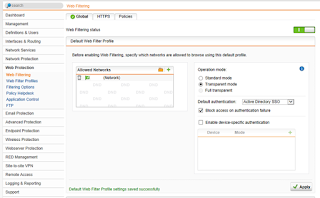
Add AD groups

Change operation mode to "Standard mode"

Enable SSH

Create firewall access rule

Disable telemetry

Copy HTTPSi certificate to GPO

Email notification settings

Now the basic settings ready!
Open the browser settings page http://your_ip:4444/
Write data on the name, password, etc.


Interfaces&Routing – Interfaces – Hardware: We find all network adapters "Virtual machine mac-address" = "Console mac-address"
Interfaces&Routing – Interfaces – Interfaces: Assigning IP addresses to adapters, except the network for replication


001
|
/usr/local/bin/confd-client.plx set ha advanced virtual_mac 0
|
Networks for DNS


Now create a AD Authentication


Monday, October 17, 2016
How to configure UTM Sophos firewall as a proxy server? (Part1 Install)
Sophos UTM is easy to install.
I asked for ISO to Sophos website
2 Virtual Machine: 4 CPU, RAM 4Gb, HDD 20 Gb, 5 Ethernet adapter (User, Managment, ISP1, ISP2, Cluster Replication)
Now choose the IP address for each network


I asked for ISO to Sophos website
2 Virtual Machine: 4 CPU, RAM 4Gb, HDD 20 Gb, 5 Ethernet adapter (User, Managment, ISP1, ISP2, Cluster Replication)
Now choose the IP address for each network


I'll try to guess the management ethernet :)

Set IP for managment network


Now go to the virtual machine console (e.g. VMWare) and verify (ifconfig) that the "Virtual machine mac-address" = "Console mac-address". If you have not guessed the management network, you need to determine adapter and change the network in a virtual environment.
Now add the route to the local network (eth1 = managment network):
001
|
route add -net 172.16.0.0 netmask 255.240.0.0 gw 172.16.52.1 eth1
|
Now we are ready to open the web-management console (https://ip:4444)
Sunday, October 16, 2016
Exchange Dynamic Distribution Group Members
Popular articles MS "View members of a dynamic distribution group" describes how you can get a list of users who will delivery.
But if you create a dynamic distribution group based on the Organizational Unit, this article does not apply :)
This can be verified if to do so:
and see the value of:
there is no filter "Organizational Unit"
To add an OU, you can use the filter type:
But if you create a dynamic distribution group based on the Organizational Unit, this article does not apply :)
This can be verified if to do so:
$FTE = Get-DynamicDistributionGroup "Full Time Employees"
and see the value of:
$FTE.RecipientFilter
there is no filter "Organizational Unit"
To add an OU, you can use the filter type:
Get-Recipient -OrganizationalUnit $FTE.RecipientContainer.DistinguishedName
Subscribe to:
Posts (Atom)